How to Go Live with Custom RTMP
Connect a custom streaming destination to Streamable with a Stream URL and Stream Key.
Step 1:Open Destinations
Go to https://streamable.run/destinations while signed in to Streamable.
Step 2:Add a Custom Destination
Click Add Destination. Enter a Name and select Custom under Platform.
Step 3:Enter the Stream URL and Stream Key
Paste the Stream URL from your destination into the Stream URL field.
Paste the Stream Key from your destination into the Stream Key field.
If your destination gives you one combined RTMP or RTMPS URL that already includes the key, paste the full value into Stream URL and leave Stream Key blank.
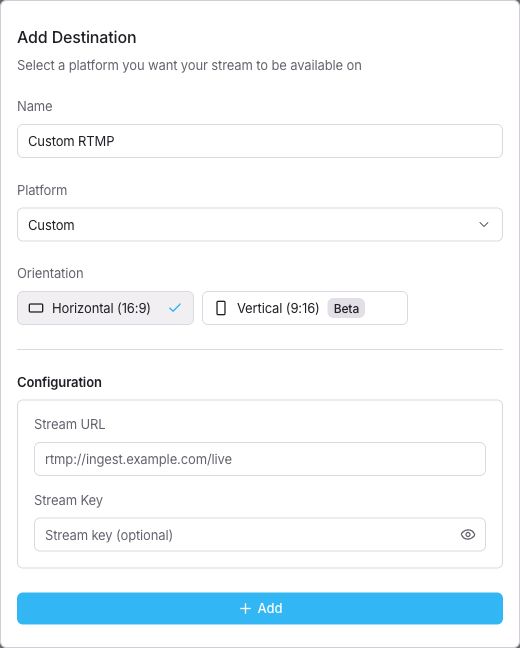
Step 4:Create the Destination
Enter a Name and the connection details, then click Add.
Step 5:You're All Set
Confirm the destination is enabled. Start your server, confirm the ingest preview, then start the destination from the Dashboard.
Optional: Deep-Dive FAQ
Open only if you still need extra troubleshooting context.
What do I need for a custom destination?
You need the destination Stream URL. Enter a separate Stream Key only when the destination provides one. A complete URL can include the key.
Can I use RTMPS for a custom destination?
Yes. Use the RTMP or RTMPS URL provided by the destination. Streamable supports stream URLs that start with rtmp:// or rtmps://.