How to Add LiveU / DSLR as an Ingest for Live Streaming
Follow these steps to connect a LiveU Solo to your Streamable ingest and view the feed in the Streamable Dashboard.
Step 1:Start Your Streamable Server
Open the Streamable dashboard and start your server.
Step 2:Reveal the LiveU Connection Details
On the Ingests page at https://streamable.run/ingests, select the ingest you want the LiveU to use.
Open the LiveU (DSLR Camera) section and reveal the connection details.
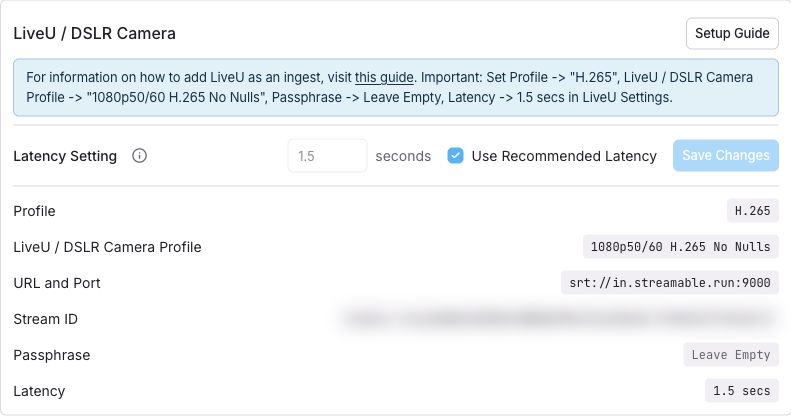
Keep the "URL and Port" and Stream ID visible. You will copy both values into LiveU Solo.
Step 3:Open the LiveU Solo Dashboard
Open the LiveU Solo Dashboard in a browser.
Choose the Solo unit you want to send into Streamable.
Step 4:Select a New Destination
Click "Select new destination" in the LiveU Solo Dashboard.
Step 5:Choose the SRT Caller Destination
Select "SRT-OUT-Caller-Solo" from the destination list.
This configures LiveU Solo to call out to Streamable over SRT.
Step 6:Choose Codec and Profile
Set Codec to "h265".
Set Profile to "1080p50/60 H.265 No Nulls".
Step 7:Paste the Streamable Connection Details
Copy the "URL and Port" from Streamable into LiveU Solo.
Copy the Stream ID from Streamable into the Stream ID field in LiveU Solo.
Leave the Passphrase field empty.
Use the values from the same Streamable ingest you selected earlier.
Step 8:Set Latency and Save the Destination
Set Latency to the value shown in Streamable. The default is 1.5 seconds.
Click "Save Destination".
Step 9:Set LRT Latency
Set LRT Latency to 5 seconds.
Step 10:Go Live in LiveU Solo
Click "Go Live" in the LiveU Solo Dashboard.
LiveU Solo will begin sending video to Streamable as an ingest.
Step 11:View the Feed in Streamable
Return to the Streamable Dashboard.
On the Dashboard, select your input in Ingest manager. Select its scene, then confirm the video in Stream preview.
On the Dashboard, click Start Stream. Select the destinations in the dialog, then confirm the start.
Optional: Deep-Dive FAQ
Open only if you still need extra troubleshooting context.
What does this guide help with?
This guide shows how to configure a LiveU Solo SRT caller destination so it sends video into Streamable as an ingest.
How long should this setup take?
Most users can complete this in about 4 to 6 minutes once their Streamable server and LiveU Solo Dashboard are available.
Where should I start first?
Start by launching your Streamable server, then open the Ingests page and reveal the LiveU connection details for the ingest you want to use.
What if the LiveU feed does not appear in Streamable?
Confirm the server is running. Use URL and Port, Stream ID, and the displayed latency from the same ingest. Leave Passphrase empty. Confirm the H.265 profile, save the destination, then restart the LiveU stream.