How to Go Live on Twitch
Connect Twitch to Streamable with Twitch login or your Twitch stream key.
Step 1:Open Destinations
Go to https://streamable.run/destinations while signed in to Streamable.
Step 2:Add a Twitch Destination
Click Add Destination. Enter a Name and select Twitch under Platform.
Step 3:Choose How to Connect Twitch
Click Login with Twitch and approve access. Streamable creates the destination when you return.
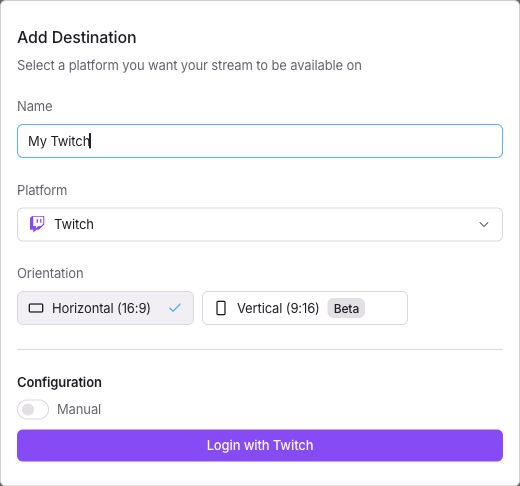
For manual setup, enable Manual. Enter Stream Key, then click Add.
Step 4:Create the Destination
After login, confirm the destination appears in the list. For manual setup, click Add after you enter the details.
Step 5:You're All Set
Confirm the destination is enabled. Start your server, confirm the ingest preview, then start the destination from the Dashboard.
Optional: Deep-Dive FAQ
Open only if you still need extra troubleshooting context.
Can I connect Twitch without logging in?
For manual setup, enable **Manual**. Enter **Stream Key**, then click **Add**.
Where do I add Twitch in Streamable?
Click **Add Destination**. Enter a **Name** and select **Twitch** under **Platform**.