How to Go Live on Kick
Connect Kick to Streamable with Kick login or your Kick stream details.
Step 1:Open Destinations
Go to https://streamable.run/destinations while signed in to Streamable.
Step 2:Add a Kick Destination
Click Add Destination. Enter a Name and select Kick under Platform.
Step 3:Choose How to Connect Kick
Click Login with Kick and approve access. Streamable creates the destination when you return.
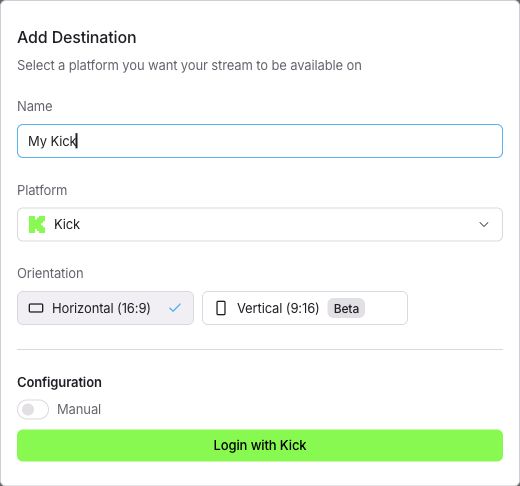
For manual setup, enable Manual. Enter Stream URL + Stream Key, then click Add.
Step 4:Create the Destination
After login, confirm the destination appears in the list. For manual setup, click Add after you enter the details.
Step 5:You're All Set
Confirm the destination is enabled. Start your server, confirm the ingest preview, then start the destination from the Dashboard.
Optional: Deep-Dive FAQ
Open only if you still need extra troubleshooting context.
Can I connect Kick without logging in?
For manual setup, enable **Manual**. Enter **Stream URL** + **Stream Key**, then click **Add**.
Where do I add Kick in Streamable?
Click **Add Destination**. Enter a **Name** and select **Kick** under **Platform**.